Pricing checked November 9, 2026 · Desk review
Fireflies AI Pricing 2026: What You Really Pay Per Seat
Four plans, one shared credit pool and a billing toggle that moves the price by 80%. Here is the math, the limits and who should skip it.
Summary
Fireflies AI pricing runs from a free plan to $39 per seat on Enterprise, but the number on the card is rarely the number on the invoice. Pro costs $10 per seat on annual billing and $18 on monthly billing, an 80% gap. AI credits are a shared pool that does not grow with seats, and running out can trigger a paid add-on. We checked the live pricing page, the credits guide and four review platforms on November 9, 2026, then built the cost math you can paste into a sheet.
Fireflies.ai is worth paying for if your calls need CRM sync, search across months of meetings and unlimited summaries, but the card price is not the bill. Pro is $10 per seat on annual billing and $18 monthly, an 80% premium, and AI credits sit on top. Our score is 7.6 out of 10: deep features, fair headline prices, awkward add-on billing.
- Feature depth
- 9/10
- Headline pricing
- 8/10
- Billing clarity
- 6/10
- Free plan
- 6/10
- Integrations
- 9/10
- Trust at cancellation
- 6/10
- Pro at $10 per seat (annual) includes unlimited transcription and unlimited AI summaries
- Zoom, Meet and Teams capture plus CRM and Slack sync on paid tiers
- G2 4.7, Capterra 4.9 and Trustpilot 4.5 across more than 2,300 reviews
- Monthly billing costs 80% more on Pro and about 53% more on Business
- AI credits are a one-time shared pool (20 to 50) that does not scale with seats
- Running out of credits can auto-subscribe a workspace to a paid add-on
Free plan available · No card needed to start
How we checked it
- Plan paid
- None. Public pricing page, knowledge base and review platforms only; no paid subscription
- Version tested
- Pricing page and AI credits guide as published November 8 to 9, 2026
- Test period
- 2026-11-06 → 2026-11-09
This is a desk review, not a hands-on trial. Between November 6 and November 9, 2026 we read the live Fireflies pricing page, the comparison table under it and the knowledge base article on AI credits, then pulled ratings and recurring complaints from G2, Capterra, Trustpilot and Product Hunt, and read Reddit threads where teams discuss the credit model. We did not record a single meeting with the tool, so we make no claims about transcription accuracy beyond what reviewers report. Every number in the testing section is either copied from a Fireflies page (with the date) or computed from those prices in a spreadsheet. Prices change, so treat anything older than a quarter as stale.
Should you pay for Fireflies?
YES if you...
- Sales, RevOps and customer success teams that want talk-time and topic analytics next to the CRM record
- Finance and ops leads who sit in many calls a week and need to search what was agreed three months ago
- Small teams happy with a visible notetaker bot in the meeting
- Anyone who will commit to annual billing and has a 2-hour meeting ceiling
NO if you...
- People who record a handful of calls a month: the free plan or a cheaper tool is enough
- Teams that cannot have a bot join calls, for example sensitive or informal meetings
- Buyers who need a fixed monthly bill with no variable add-ons
- Heavy daily recorders on Pro, where 8,000 minutes of storage per seat becomes a ceiling
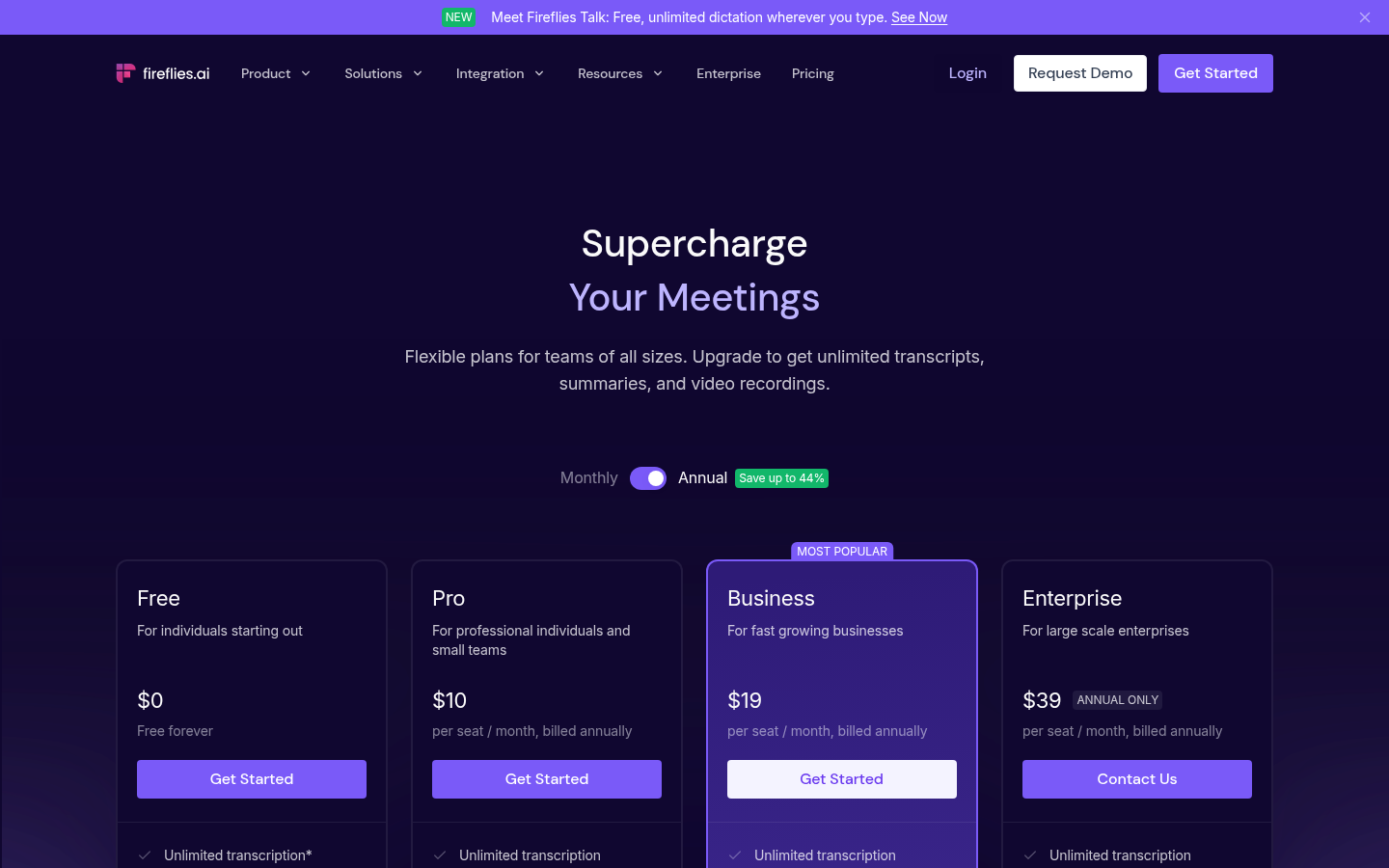
Fireflies plans, per seat, as listed November 2026
Annual price is what the pricing page shows by default. Monthly billing is higher, and Enterprise is annual only.
Free
For individuals starting out
- Unlimited transcription (fair-use limits apply)
- Limited AI summaries
- 400 minutes of storage per team
- 20 AI credits, one time, shared
- 2-hour recording limit
Pro
$18 per seat if billed monthly
- Unlimited transcription and AI summaries
- 8,000 minutes of storage per seat
- 20 AI credits, one time, shared
- Video recording and downloads
- Unlimited integrations
- 2-hour recording limit
Business
$29 per seat if billed monthly
- Everything in Pro
- Unlimited storage
- 30 AI credits, one time, shared
- Conversation intelligence and team analytics
- Multi-language mode
- 3-hour recording limit
Enterprise
Annual only, contact sales
- Everything in Business
- 50 AI credits, one time, shared
- SSO, SCIM and audit logs
- HIPAA compliance and private storage
- Custom data retention
- 4-hour recording limit
ROI breakdown: At 10 Pro seats, annual billing is $1,200 a year and monthly billing is $2,160, so the toggle alone costs $960. For a 5-person Business team on annual billing the list price is $95 a month before any AI credit add-on.
Hidden costs & gotchas
- Monthly billing adds $8 per Pro seat and $10 per Business seat versus annual
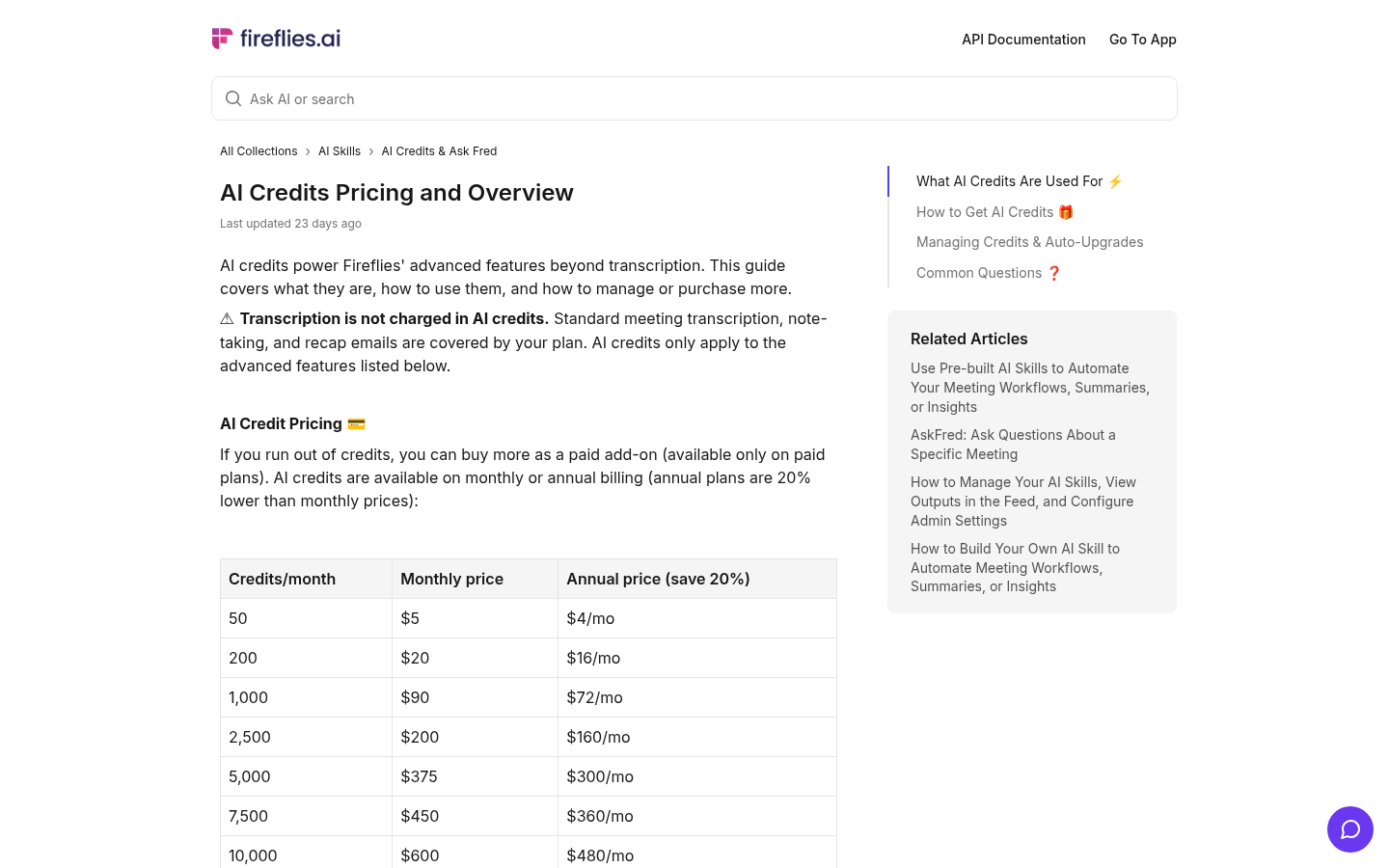
- AI credit add-ons start at $5 a month for 50 credits and reach $600 a month for 10,000
- Personal Assistant digests and Meeting Prep are on by default and consume credits
- Unused purchased credits do not roll over to the next billing cycle
- Upgrading replaces your plan credits instead of stacking them
The numbers behind the price
Sourced from the Fireflies pricing page and credits guide (November 8 to 9, 2026) or computed from them.
- Pro price gap, monthly vs annual
- 80 % $18 vs $10 per seat, from the pricing page
- Business price gap, monthly vs annual
- 53 % $29 vs $19 per seat, computed
- Pro storage per seat
- 8,000 minutes About 133 hours; Free is 400 minutes per team
- Shared AI credits included
- 20 / 20 / 30 / 50 Free, Pro, Business, Enterprise; one-time and pooled per team
- Entry AI credit add-on
- $5 /mo for 50 credits Auto-subscribed when credits run out on a paid plan
- Largest AI credit add-on
- $600 /mo for 10,000 credits $480 a month on annual billing
- Cost of 10 Pro seats
- $1,200 vs $2,160 per year Annual vs monthly billing, computed
- Reviews across four platforms
- 2,423 G2 756, Capterra 736, Trustpilot 899, Product Hunt 32
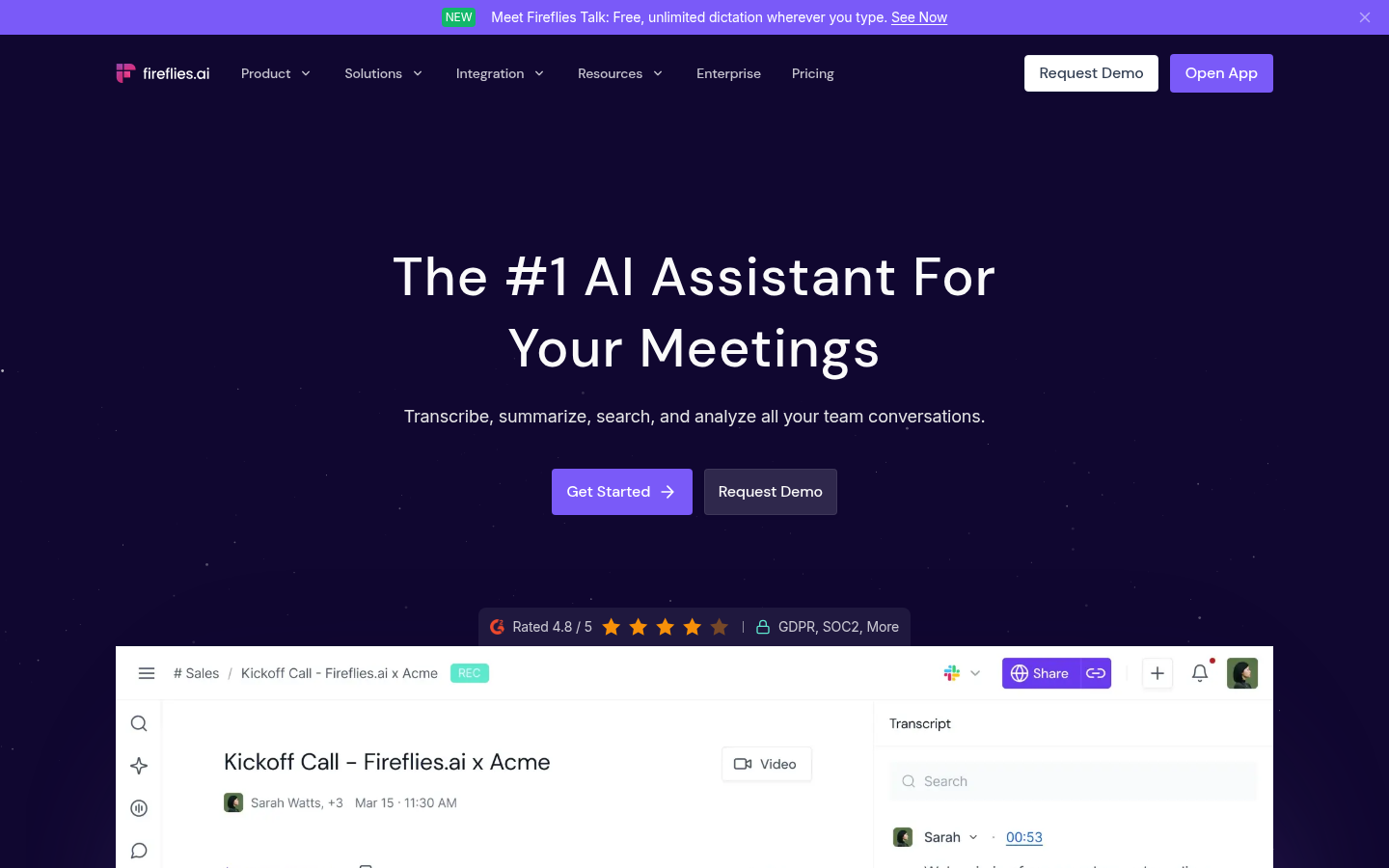
Open the home page. What does it promise and what does it show first?
Open the pricing page with the annual toggle on. Which price is shown first?
Read the AI credits article. What happens when credits run out?
Pros and cons
Pros
- Unlimited transcription and summaries from $10 per seat
- Deep integrations and conversation analytics
- Strong, consistent review scores
- Security posture for regulated teams
Cons
- The billing toggle moves the price by 80% on Pro $10 versus $18 per seat. Teams that start monthly to stay flexible pay $960 more a year at 10 seats.
- AI credits are a shared, one-time pool that cannot grow with headcount 20 credits on Pro for a whole workspace, whether 1 seat or 50. Heavy use of AI Skills, Live Assist or CRM autofill pushes you to add-ons.
- Auto-subscribe to a paid add-on when credits run out The guide says paid workspaces without a credits plan are subscribed to $5 a month for 50 credits. Recent Trustpilot complaints describe surprise $5 charges and slow cancellation support.
- Visible bot and a recording cap per meeting The notetaker joins as a participant, which some reviewers find intrusive in informal calls, and Pro caps a single recording at 2 hours.
Final verdict
Fireflies earns its place if meetings are a core part of your job and you will use search, summaries and CRM sync every week. At $10 a seat on an annual term, Pro is a fair price for unlimited transcription and summaries, and Business at $19 is justified once a team needs analytics and unlimited storage.
The part to watch is everything around the card price. Choose annual only if you are sure, because monthly billing costs 80% more on Pro. Treat the 20 to 50 included AI credits as a trial, not an allowance, and switch off Daily Digest and Meeting Prep if you do not want them spending credits in the background. Pause auto-upgrade in Settings on day one so a depleted pool does not become a surprise subscription.
We did not test transcription accuracy ourselves, so this score is about pricing and packaging, not audio quality. If you only record a few calls a month, start on Free. If you refuse bots in your calls, look at a Chrome extension tool such as TicNote instead.
- Feature depth 9/10 Search, analytics, CRM sync
- Headline pricing 8/10 $10 and $19 per seat annual
- Billing clarity 6/10 Toggle gap and credit add-ons
- Free plan 6/10 400 minutes per team
- Integrations 9/10 Meetings, Slack, CRMs
- Trust at cancellation 6/10 Recurring billing complaints
Fireflies pricing questions
How much does Fireflies AI cost per month?
Is Fireflies AI free to use?
What are Fireflies AI credits and do they expire?
Is annual or monthly billing better for Fireflies?
What happens when I run out of AI credits?
Can I use Fireflies without a bot joining my meeting?
Update log
- Initial publication. Pricing page, AI credits guide and review platform ratings checked on November 8 and 9, 2026.